# File Storage
Create migrations to alter trainings table
Add attachment input in views
Create Symbolic Link
Check in Controller if the input has attachment and update row with the file name.
Delete the file on storage if the row will be deleted
Open attachment file
# 1. Create migrations to alter table
php artisan make:migration alter_articles_table_add_attachment
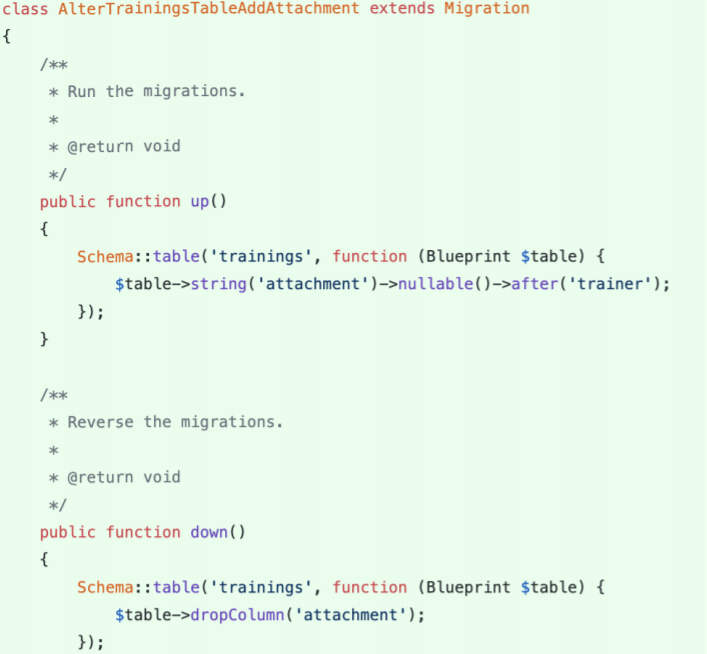
# 2. Add attachment input in views
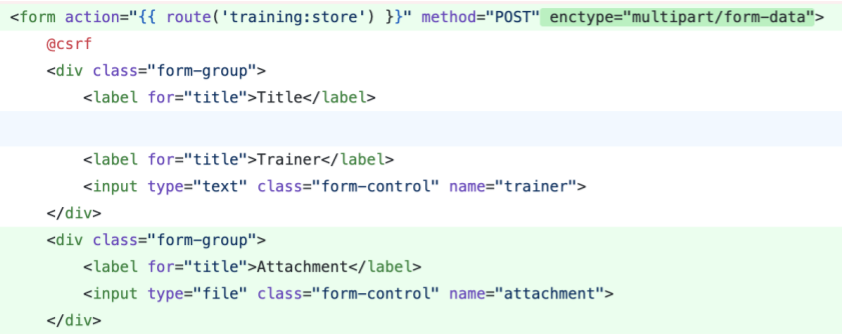
create.blade.php
# 3. Create Symbolic Link
The public disk is intended for files that are going to be publicly accessible.
By default, the public disk uses the local driver and stores these files in storage/app/public.
To make them accessible from the web, you should create a symbolic link from public/storage to storage/app/public.
To create the symbolic link, you may use the storage:link Artisan command:
php artisan storage:link
# 4. Check Controller
Check in Controller if the input has attachment and update row with the file name.
In Model, update fillable with attachment to allow mass assignment method.
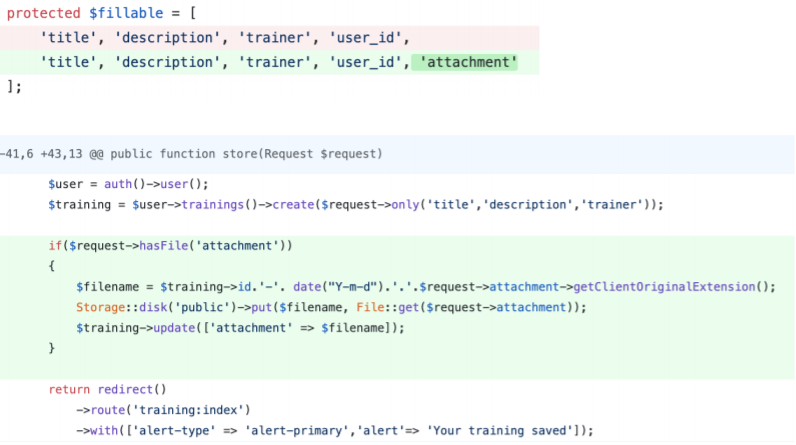
# 5. Delete
Delete the file on storage if the row will be deleted

TrainingController.php on delete method
# 6. Open Attachment

show.blade.php